Sound Meter
A sound level meter for iPhone that is honest about what it does not know.
Free, ad-supported. No account. Audio is processed on your phone.
Listed on the App Store as Sound Meter: dB SPL Veltora.
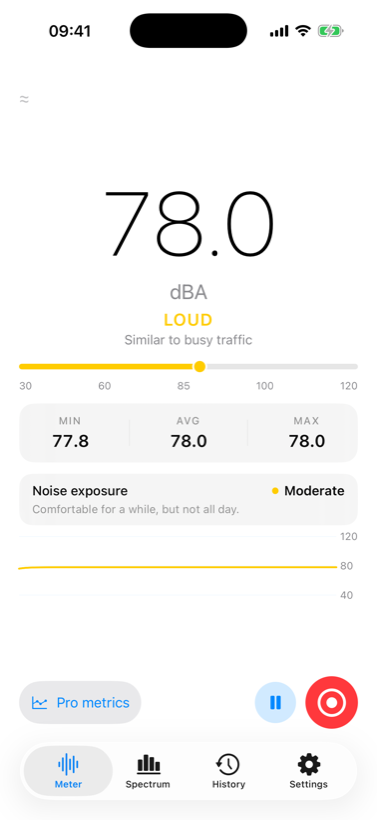
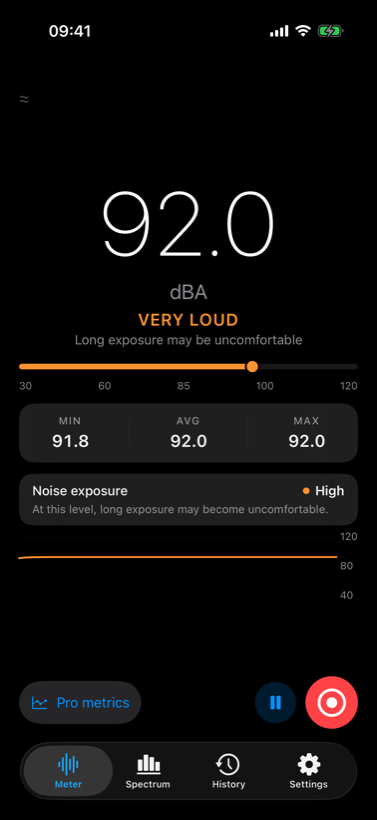
Point your iPhone at a sound and it tells you how loud it is, in decibels, with the weightings and time constants a real sound level meter uses. Record a session and you get the statistics that actually matter afterwards — the energy average, the peak, the quietest moment — plus a CSV or PDF you can send to someone.
And when it does not know something, it says so. That is the part most of these apps skip.
Every professional metric, free
Not a trial, not a teaser. The full measurement feature set is in the free version. Paying removes the advertising — that is all it does.
| Measurement | Free | Premium |
|---|---|---|
| LAeq — energy-average level | Yes | Yes |
| LCpeak — instantaneous peak | Yes | Yes |
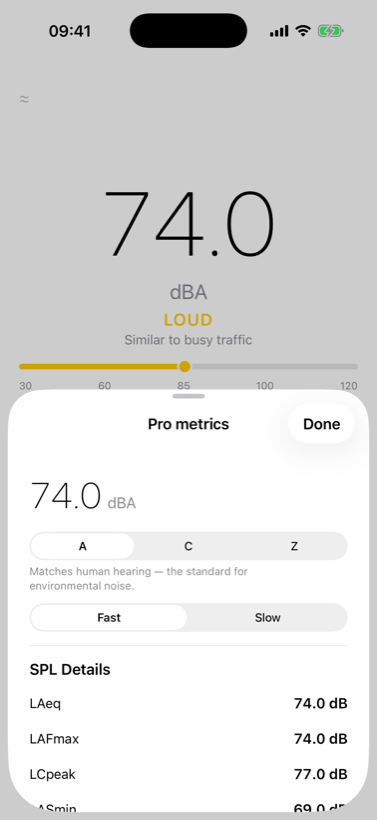
| LAFmax / LASmin | Yes | Yes |
| A, C and Z weighting | Yes | Yes |
| Fast and Slow time weighting | Yes | Yes |
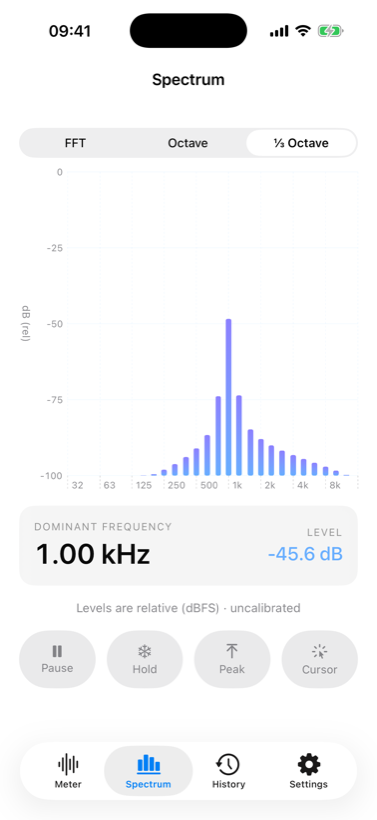
| FFT spectrum + dominant frequency | Yes | Yes |
| Octave and 1/3-octave bands | Yes | Yes |
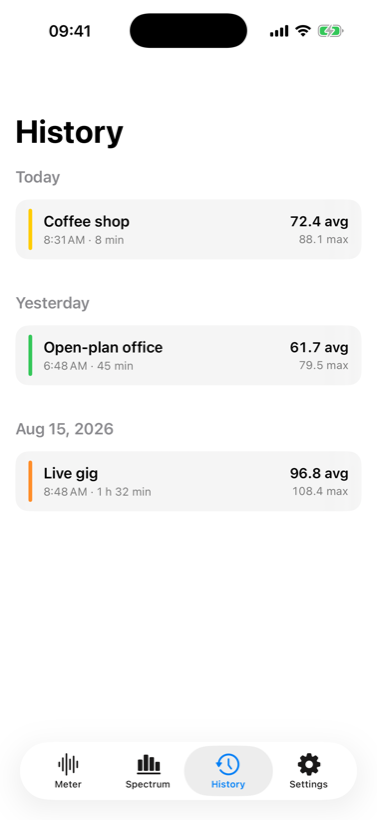
| Session recording and history | Yes | Yes |
| CSV and PDF export | Yes | Yes |
| Advertising | Banner | None |
US reference prices: $1.99 per year (auto-renewing) or $4.99 once for lifetime ad removal. Local prices and taxes may vary; the purchase screen shows the applicable price. It exists so the app can stay free for everyone else, not to hold a measurement hostage.
What it looks like
The honest part
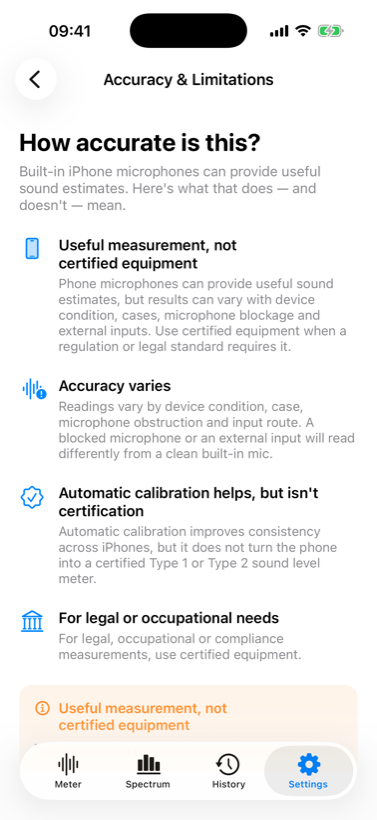
This is not a certified sound level meter, and it does not pretend to be. Readings are labelled Approximate in the app and in every export, because the absolute level currently rests on a provisional constant rather than a calibration measured against a reference instrument.
We are running that measurement programme now — a real reference meter, several iPhone models, three levels each. When it produces measured per-device profiles, they ship, and the label changes because it has been earned.
Some things follow from that, and they are worth stating plainly rather than burying:
- Use certified equipment where a regulation requires it. A phone is not admissible evidence for a legal noise limit, whatever any app tells you.
- Every phone's microphone is different. There is no such thing as "the iPhone microphone" — the correction is per model, which is why a single number claimed across all devices should make you suspicious.
- A case, a finger or a pocket changes the reading. The app watches for a blocked microphone and tells you rather than quietly reporting a low number.
- An external microphone is not the built-in one. Connect Bluetooth or USB-C and the app says so, and refuses to apply a calibration that was never measured for it.
What it will not do
When there is no measurable signal, the reading is --, not 0 — a dead or covered microphone is not a quiet room, and showing a confident zero would be a lie with a friendly face. When measurement is paused, the number disappears rather than freezing at its last value. When a session is recovered after a crash, its duration comes from the recorded data, not from the wall clock.
None of that is remarkable. It is just the difference between a meter and a number generator.
Your sound stays on your phone
Measurements stay local
Audio is analysed on the device. We do not upload measurements; you choose whether to share an exported report.
No account, ever
No sign-up, no email, no login. Open it and measure.
Microphone access for measurement
No location, contacts or photo-library permission is needed to measure. Advertising has separate consent, age-eligibility and tracking controls.
Ads never see your audio
Advertising is standard Google AdMob and receives no measurement, no recording and no audio — on either tier.
The full detail, including exactly what the ad network receives and how to opt out, is in the privacy policy.
Questions people actually ask
- How accurate is it?
- Good enough to compare rooms, track a trend and know whether something is loud enough to matter. Not good enough to cite in a dispute. Until the calibration programme finishes, the app says Approximate — and it will keep saying so until that changes.
- Why does it read differently from another app?
- Usually because of definitions rather than errors. "MAX" in this app is the highest time-weighted level, the standard LAFmax; several apps report an instantaneous peak hold instead, which prints a visibly larger number for the same sound. Both are legitimate. Ours labels which one it is, and reports the instantaneous peak separately as LCpeak.
- Can I measure with the screen off?
- Yes, if you turn that on in Settings. Otherwise measurement stops when you leave the app — and there is a Pause control, so you can stop the microphone without closing anything.
- Does it work with an external microphone?
- It records through one, and it tells you it is an external input. It will not apply a calibration measured for the built-in microphone to hardware it has never seen.
- What do I get for paying?
- No ads. That is the entire difference. Every measurement feature is free.
- Where are my recordings kept?
- In the app's private storage on your iPhone, deliberately excluded from iCloud backup so raw audio does not leave the device that way either. Delete a session and its audio goes with it.
Requirements
iPhone running iOS 17 or later.